Guidelines for China Online VISA Application
The Consulate General of the People's Republic of China in Toronto has officially launched the China Online VISA Application system. Visa applicants could enjoy more convenience using the system to fill out forms, upload materials for online preliminary review and track the status of application. Visa application via the system consists of 3 main steps:
I.Signing up and Logging into Your Account
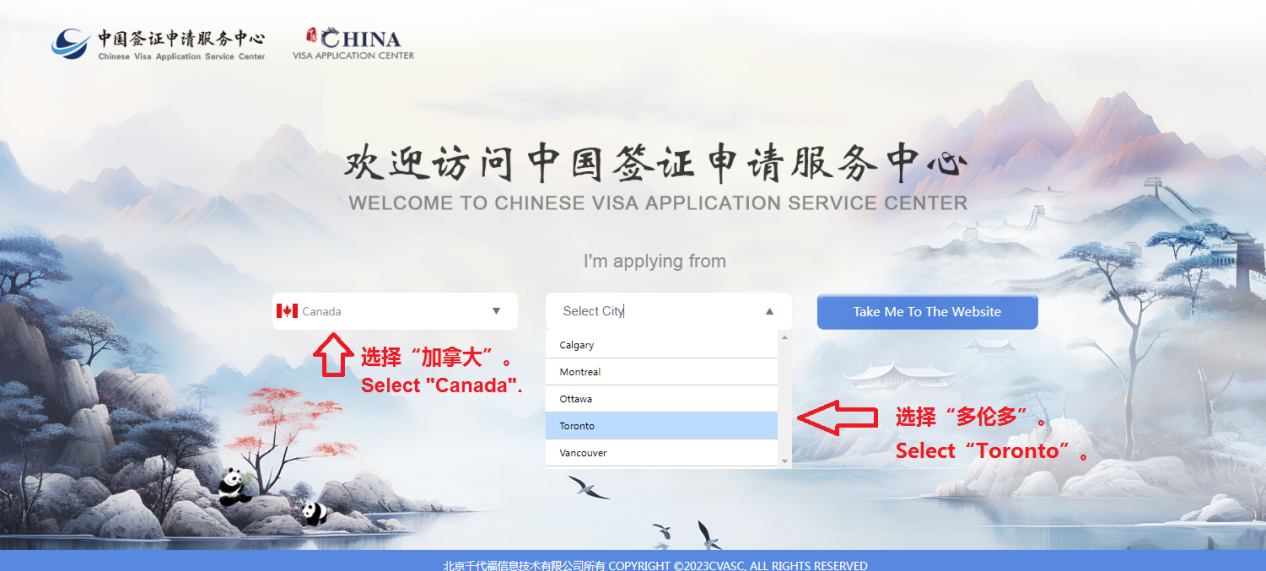
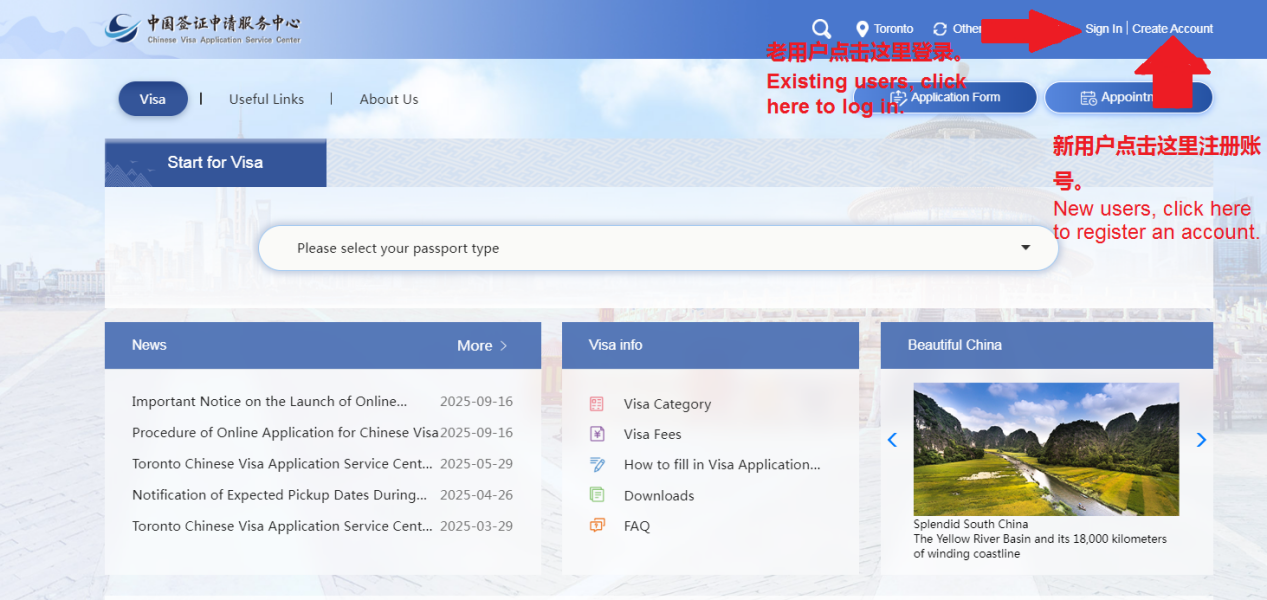
Please go to the website of the Chinese Visa Application Service Center at www.visaforchina.cn, select "Canada,Toronto", click the [Create Account] button at the top-right corner of the webpage, use your email address to sign up, then sign in with your email account.


II.Filling out the Form and Uploading Materials
Please click the [Application form] button at the top-right corner of the webpage. Read the “Guidelines for Filling in the China Online Visa Application (COVA) Form”thoroughly, fill in the form and upload materials according to the instructions.


There are 9 sections to complete in the application form: Personal information, Type of visa, Work information, Education, Family information, Information on your travel, Information on previous travel, Other information and Declaration. Please fill out the form in Chinese or English sequentially. After finish all of the required fields (marked with *) on each page, click [Next] to proceed. You may also click the [Save] button to save your progress during the application process.
1.Personal Information
(1)When uploading your photo, the system supports editing the photo using dragging and cropping tools and automatically determines whether the photo meets the requirements or not. If you fail to pass the check after multiple uploads, you may still continue filling out other sections and do remember to bring a standard ID photo when you submit your passport to the Chinese Visa Application Service Center in Toronto.
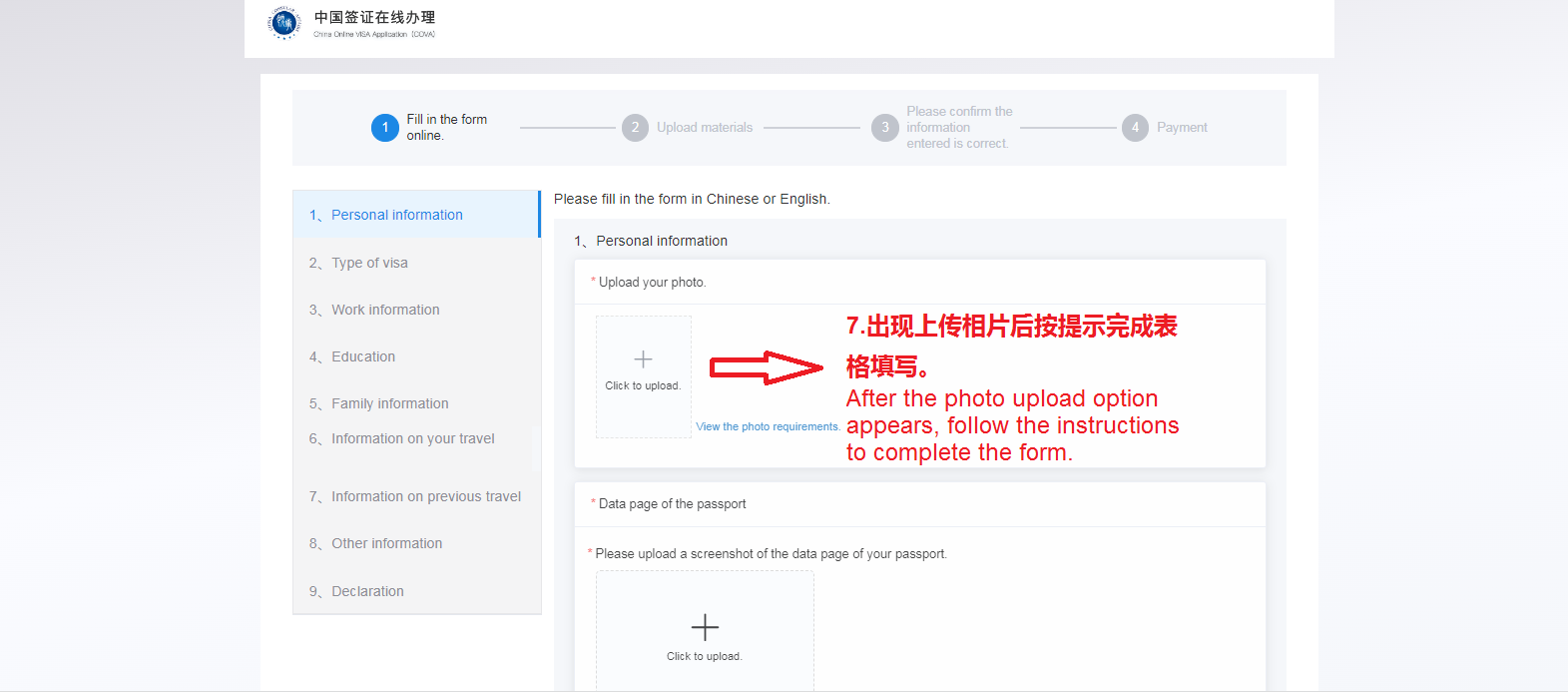
(2) Automatic recognition of passport bio-page will assist you filling in your name, nationality and passport information. Please check that all information is accurate before confirm action and the system will fill in relevant fields.(If you held Chinese nationality before, please fill in 1.1D Chinese Name)
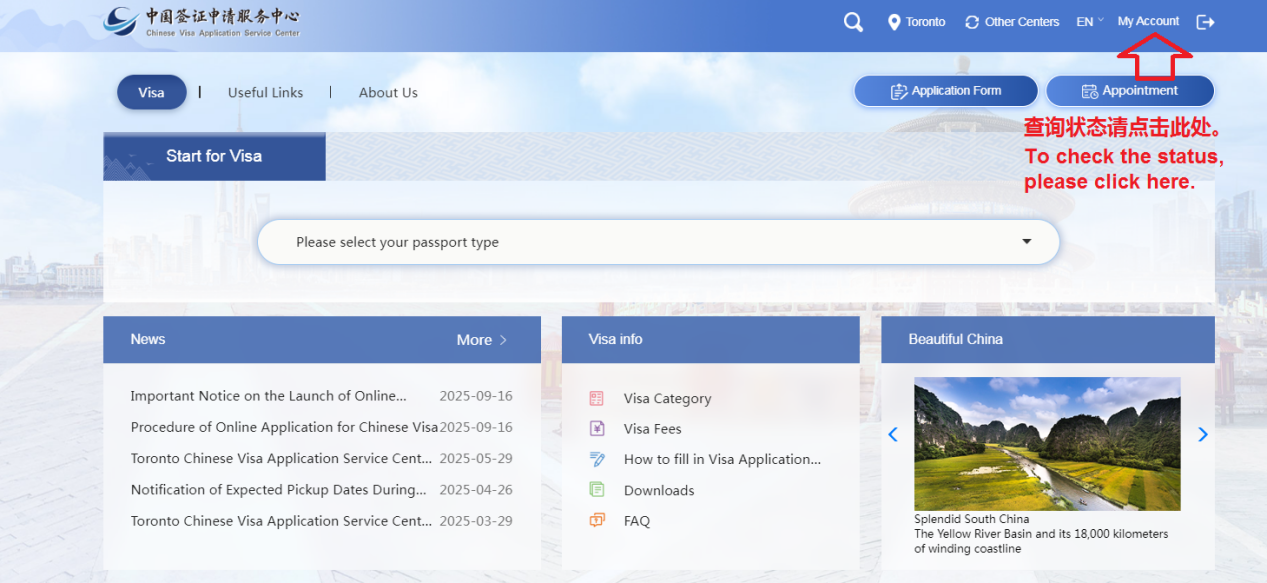
(3) If the system prompts that the current applicant already has an application pending, you may click [My Account] at the top-right corner to view the processing status of your application.
2.Type of visa
Please select your visa type based on the purpose of your visit to China. Choose visa validity and intended duration of stay as needed.
Please note that whether to issue a visa, the type of visa, number of entries, validity and duration of each stay will be determined by consular officials. It may differ from those you filled in on the application form.
3.Work Information
Please fill in your work experience in the past 5 years truthfully, and provide the full name of your company/organization without abbreviations. If you have multiple work experiences within the past 5 years, please click [Add] at the bottom right to add extra entries.
4.Education
Please truthfully fill in your highest level of education. If you have multiple educational backgrounds, click [Add] in the bottom right to add extra entries.
5.Family Information
Please provide relevant information truthfully. If you select [Not Applicable], a detailed explanation shall be added.
6.Information on your travel
(1) Please fill in your arrival and departure dates and cities according to your travel plan. Please note that the system only accepts visa applications for entry dates within the next 90 days. Applications submitted outside of this period will not be processed.
(2) [6.5 Person sharing the same passport with you] applies only when someone traveling with you uses the same passport. If you are traveling with others who hold different passports, please select “No” for this entry.
7.Information on previous travel
Please truthfully fill in your travel history, mainly including whether you have been to China, obtained a Chinese visa and your travel record within the past 12 months.
8.Other information
Please complete this section based on your personal experience and fact, a statement explaining circumstances may be asked to provide.
9.Declaration
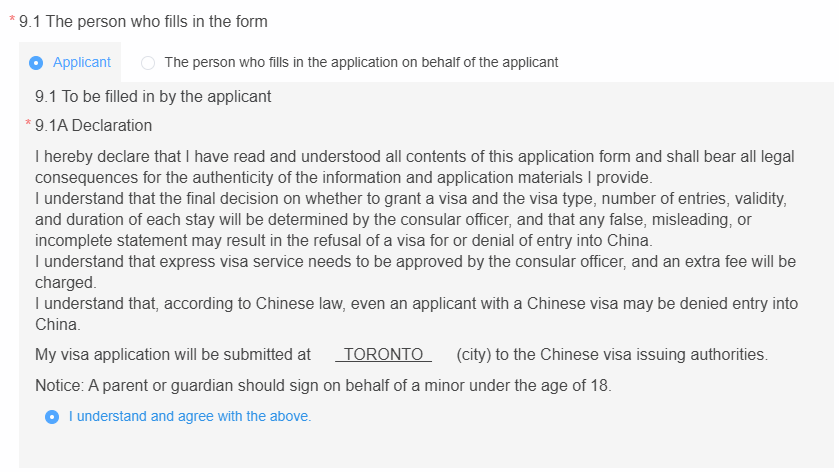
Please select the filer’s identity (the applicant or the person who fills in the application on behalf of the applicant; those filling on behalf of others shall provide their personal information and relationship to the applicant).
After reading and agreeing to the statement below, check the box [I understand and agree with the above].

10.Uploading materials
Please take photos and upload the required documents as per system instructions (image and PDF are supported). To expedite processing, make sure that all uploaded materials are complete, clearly visible, and evenly lit. Documents marked with red dashed borders are mandatory and must be uploaded.

11.Confirm the Information
(1) After uploading materials, click [Next] to proceed to confirm your information. Here, you may review the submitted information and the uploaded materials. To make changes, click the [Modify] button at the upper-right corner of the page. Once confirmed, click [Submit the application form]. Please carefully review all the information, as submitted form cannot be modified until consular officials’ review.


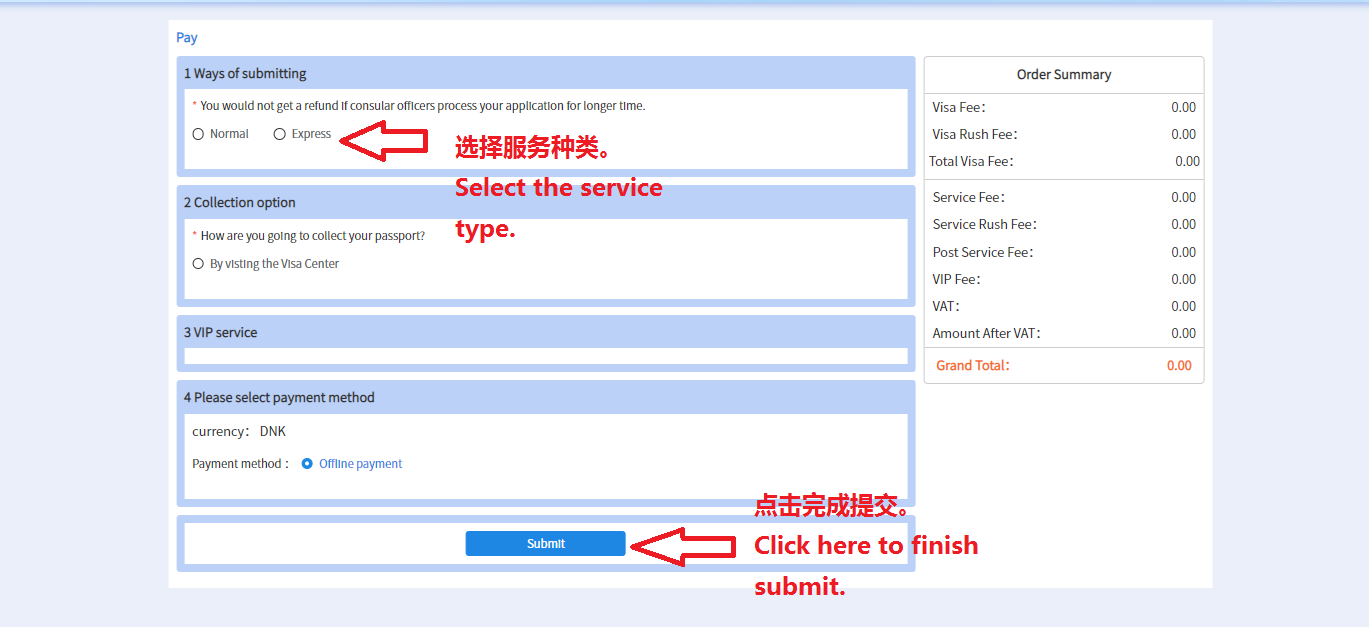
(2) Please click the [Submit] button again on the order summary page to complete the online submission of the application. Otherwise, the status will be "PENDING" (online submission process incomplete).
III.Checking the progress
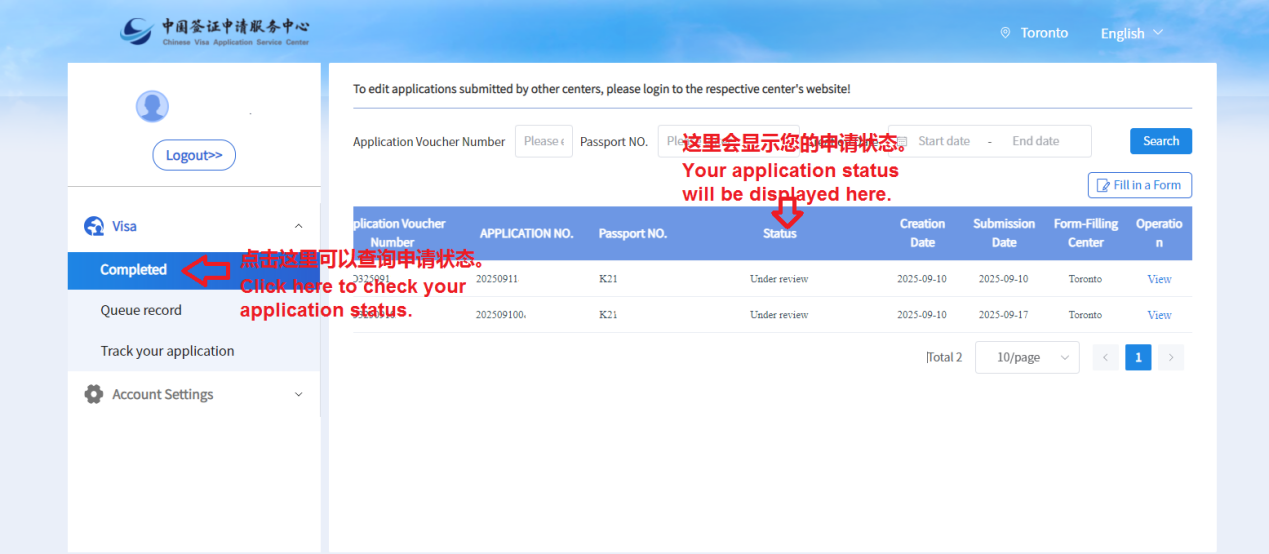
After submission, your application will enter the online preliminary review stage. You may check the progress by clicking [My Account] on the homepage. Please stay updated on the review status and pay attention to email notifications.
1. If the status shows "To be modified", please modify and supplement your application materials according to the feedback to avoid delays in the review process due to failure to provide supplementary materials in a timely manner.
Please do not cancel the order and re-submit to avoid incurring additional charges.
2. If the status shows "Unapproved", the application failed review.
3. If the status shows "Online review completed", Please print the "Visa Application Confirmation" from the email attachment. Then, bring it along with your physical documents to the Visa Application Centre to submit them and pay the fee.
Reminder:
①Online review approval does not guarantee visa issuance.
②Online review takes approximately 3-5 working days. Incorrect information in the form or submission of incomplete materials will extend the processing time for the online review.
③Applicants who require mailing services (and are eligible for fingerprint exemption) are advised to submit online application at least one month in advance. Documents should only be mailed after the online application has been approved.
④Online payment is not available at this time. Please pay the fee at the Visa Application Centre when online application is approved.